Keymap Switcher
Introduction
- It is a small plugin with allow to choose the active Keymap from the list of installed Keymaps.
- The list of Keymaps consists of :
- The Keymaps bundled with IntelliJ
- The Keymaps installed from the marketplace
- The custom Keymaps created
Installation
From the marketplace
From IntelliJ IDEA, go to Settings > Plugins > Marketplace... and search for Keymap Switcher. Once found, click on Install and restart the IDE.
From disk
- Download the zip from the release page. Then in IntelliJ IDEA go to
Settings > Plugins - Select the 3 dots at the right.
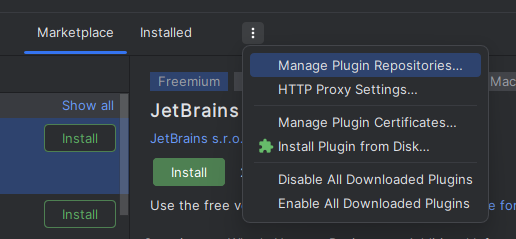
- Then click Install Plugin from Disk
- From the window dialog which appears, locate the zip of the plugin on your computer and open it.
Usage
- A widget is added to the status bar at the bottom right corner of the IDE.
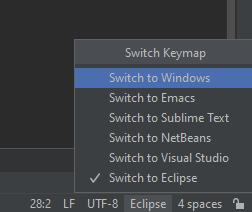
- Click on the widget to open the list of Keymaps.
- Select the Keymap you want to switch to.
- The Keymap will be switched without restarting the IDE.